
Storefront क्या है और कैसे setup करें
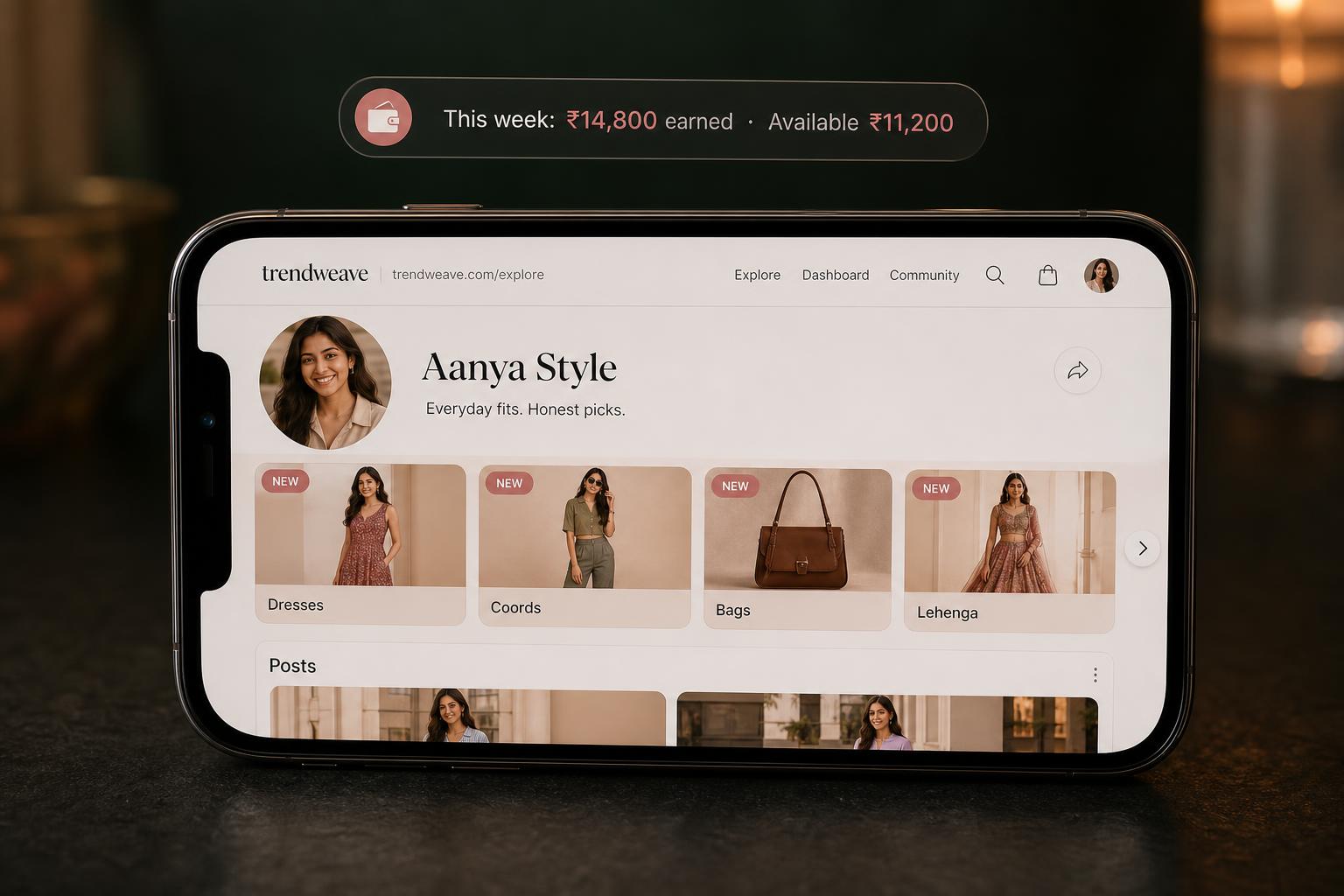
आपकी public store वह page है जो trendweave.com/explore/{username} पर है — Instagram bio की link से कोई भी visitor यहीं आता है। इसे Linktree-replacement की तरह treat करिये: एक link, एक page, हर वो post जिस पर products हैं। Instagram feed से बड़ा फ़र्क़ — store हमेशा काम करती है, सिर्फ़ post के fresh रहते नहीं।
Page पर क्या-क्या है
ऊपर: avatar, store name, follower count (Instagram से आता है), short description (Profile में edit होती है)। नीचे: horizontal Collections carousel, और उसके नीचे reverse-chronological feed — video previews, category tags और standard caption Comment "dm" for links।
Store ख़ुद बनती है — आपकी posts से
ज़रूरी बात: आप store में manually products नहीं भरते। Store = आपकी posts + वो collections जिनमें आपने उन्हें group किया। जितनी ज़्यादा posts with product-links आप publish करते हैं, store उतनी रिच होती है। एक महीने बाद आया visitor वही store देखता है जो reel के तुरंत बाद आया visitor देखता था।
Collections — navigation का main tool
जब 30+ posts हो जाएँ, feed गड़बड़ हो जाती है। Collections posts को theme से group करती हैं: Dresses, Coords, Lehenga, Bags, Sale finds — जो भी fit बैठे। एक real store में 14+ collections हो सकती हैं। Public store पर हर collection एक card है — cover (आमतौर पर पहली post) और count जैसे 29 posts। एक ही post एक साथ कई collections में रह सकती है।
On-brand रहिये
अभी Trendweave के सारे active retailers Indian fashion हैं (Ajio, H&M, Shopsy, Tata CLiQ, Myntra), और audience specific niche के लिए आती है। Niche जितना tight, CR उतना ज़्यादा। एक ही collection में basic dresses और premium bags न मिलाइये — वो अलग shopping moods हैं।
Store link कहाँ से copy करें
Profile → Store link। URL trendweave.com/explore/{आपका-handle} होता है, बग़ल में Copy button। यह link Instagram bio में डालिये — setup ख़त्म; आगे ख़ुद काम करता है।
मुख्य बात: Public store वह permanent shelf है जो आपकी posts और collections से ख़ुद बनती है। Collections जितनी साफ़, viewer को ढूँढना और ख़रीदना उतना आसान।
अगला कदम: Profile में Store name और Store description set करें। उन themes के लिए 2–3 collections बनाएँ जिन पर आप post करने वाले हैं। Store link copy करें और Instagram bio में डालें।
- सीखने का परिणाम
- आपका Storefront ≥80% भर चुका है: 5 प्रोडक्ट्स descriptions और covers के साथ।
- ऐप में कदम
- Fill the Storefront with at least 5 products.
- सफलता मापदंड
- ≥50% reach the target.
- अनलॉक / पुरस्कार
- Share Storefront in Stories with a deep-link.
- फ़ॉर्मेट
- 3-min video + checklist.