
Storefront: what it is and how to set it up
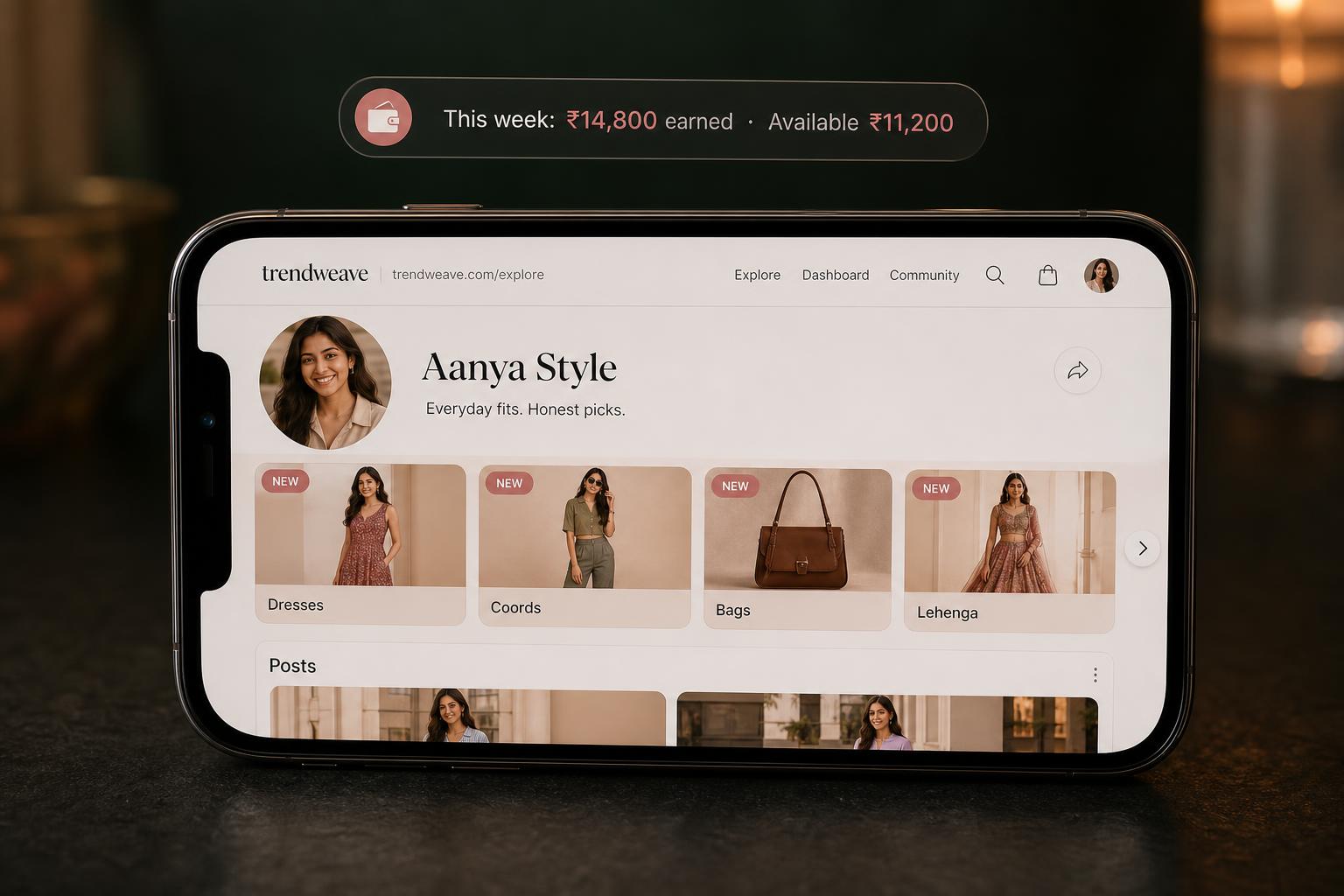
Your public store is the page at trendweave.com/explore/{username} that any visitor sees when they tap your Instagram bio link. Treat it as a Linktree-replacement: one link, one page, every post with products. The big difference from your Instagram feed — the store works forever, not just while a post is fresh.
What's on the page
Top: avatar, store name, follower count (pulled from Instagram), short description (edited in Profile). Below: a horizontal Collections carousel, and under it a reverse-chronological feed of posts with video previews, category tags, and the standard caption Comment "dm" for links.
The store builds itself — from your posts
Important: you do not manually fill the store with products. The store = your posts + the collections you grouped them into. The more posts with product-links you publish, the richer the store. A visitor who lands a month later sees the same store as someone who clicked through right after your reel.
Collections — the main navigation tool
Once you have 30+ posts, the feed turns into mush. Collections group posts by theme: Dresses, Coords, Lehenga, Bags, Sale finds — whatever fits. A real store can have 14+ collections. On the public store each collection is a card with a cover (usually the first post in it) and a count like 29 posts. A single post can sit in several collections at once.
Stay on-brand
Right now, Trendweave's active retailers are all Indian fashion (Ajio, H&M, Shopsy, Tata CLiQ, Myntra), and the audience comes for a specific niche. The tighter your niche, the higher your CR. Don't mix basic dresses with premium bags in one collection — those are different shopping moods.
Where to copy the Store link
Profile → Store link. The URL is trendweave.com/explore/{your-handle}, with a Copy button next to it. Drop that link into your Instagram bio — setup done; it runs by itself from here.
Key takeaway: Your public store is the permanent shelf that builds itself from your posts and collections. The cleaner the collections, the easier it is for a viewer to find and buy.
Next step: In Profile, set your Store name and Store description. Create 2–3 collections for the themes you plan to post. Copy your Store link and put it in your Instagram bio.
- Learning outcome
- Your Storefront is ≥80% complete: 5 products with descriptions and covers.
- Action in product
- Fill the Storefront with at least 5 products.
- Success metric
- ≥50% reach the target.
- Unlock / Reward
- Share Storefront in Stories with a deep-link.
- Format
- 3-min video + checklist.